 JellyPass
Phone, web and TV apps
Members browse what's new, see what their household already has, tap Get this and follow My requests. Every app signs in with Jellyfin and sends your sign-in, searches and requests only to the household's own address; the one exception is artwork: posters, backdrops and logos load straight from TMDB's image server (image.tmdb.org), which sees your IP address and which images were loaded but no account details (see the privacy policy). All of them need the household app API switched on:
HOUSEHOLD_APP_ENABLED=true
TMDB_API_KEY=tmdb-key
with HOUSEHOLD_DOMAIN and Seerr configured. Without it, the apps' paths answer 404.
iPhone, iPad and Android
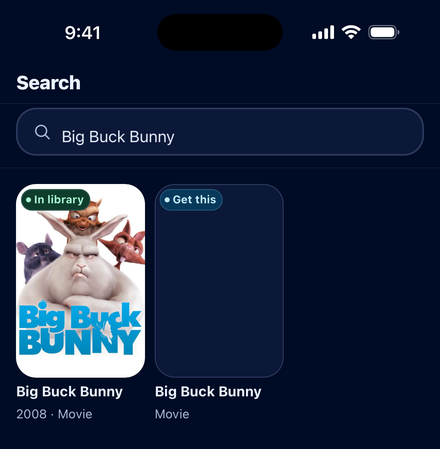
- iPhone and iPad: through TestFlight, by invitation from whoever runs your server, for now; an App Store release is on its way.
- Android: an APK installed directly (sideloaded); ask whoever runs your server for the link. Android asks the first time to allow installing from your browser or file manager, and later APKs install over the old one, keeping the sign-in.
- Server: JellyPass 3.2.0 or later with the household app on. Cancel request and the day each title was requested need 3.5.0 or later; older servers simply don't show them.
- Address: any HTTPS address, for example
https://jelly-grove.example.com. The app refuseshttp://, IP addresses and.localnames. App versions before 1.3.0 accept only addresses beginningjelly-. - Privacy: the sign-in is kept in the iOS Keychain or Android's encrypted storage. No analytics or crash reporting. See the privacy policy.
Household web app
Every household address serves an installable web app at /jellypass/app/, for example https://jelly-grove.example.com/jellypass/app/. It shares its sign-in with Jellyfin web on that address, so Play opens Jellyfin already signed in. Install it from the browser: Safari's Share → Add to Home Screen, or Chrome's Install app. On iPhone and iPad, sign in inside the installed app, which has its own storage.
Nothing to configure beyond the settings above: the app is built into the image.
TV add-on
The TV add-on adds JellyPass to Jellyfin web's own interface on chosen households' addresses: a Discover row on Home, a Discover row on Search, title pages with Play and Get this, My requests, and a Discover page behind a compass button in Jellyfin's header. It works where Jellyfin's interface is loaded from the server, such as browsers and Jellyfin's LG webOS app.
TV_ADDON_ENABLED=true
TV_ADDON_HOUSEHOLDS=grove
List one household first and check it on your TV, then add others or use * for all. Households not listed are unchanged. Members must add the household address (not your LAN address or main Jellyfin address) as their server.
Samsung TVs (advanced, unsupported)
Jellyfin's Samsung (Tizen) app bundles its own copy of Jellyfin web, so the add-on can't reach it. The repository has a JellyPass build of that app (tv/samsung/) that loads the add-on from the household address. It replaces the Jellyfin app on the TV, needs the TV in Developer Mode and Samsung's sdb tool, and uninstalling the stock app first clears its servers and sign-ins. It is aimed at people comfortable sideloading TV apps; see the TV add-on design notes.